Pay on Delivery, Done Right
Pay on delivery usually means cash payment or a prayer against fake alerts. Here's how, with Paylo, your customers pay in the app at the door, with a code that proves the delivery.

So much of Nigerian online shopping runs on pay on delivery, for an honest reason: once you have been burned by pay-and-pray, you want to see the parcel before your money moves. The problem is that the usual version solves the buyer's fear by handing every risk to the seller: cash at the door, bank alert screenshots that turn out to be apps, "my transfer is pending" while the rider stands waiting, and no record of any of it when the argument starts.
The payment industry's usual answer is to retire pay on delivery entirely and move everyone to paying upfront. Paylo's pay on delivery keeps the part buyers love and deletes the part that goes wrong. You still pay when your order arrives. But you pay in the app, never in cash, and the delivery carries its own proof.
How it works when you buy
- Place the order. Nothing is charged. The button says Place order rather than Pay, and the order sits in your history from that moment, marked as due at the door.
- The store prepares and ships. Your order screen says plainly: you'll pay when it arrives.
- When it's on its way, the pay button appears. At the door, pay in the app by bank transfer, card or your Paylo credits. Credits can cover the whole bill, with no card step and no minimum.
- The store sees "Paid" the moment your money lands, and hands your order over.
No cash means no change to argue over and no fake alert to fall for. The store never releases your order on a screenshot; it releases it on a Paid signal from Paylo. And Paylo will not let an unpaid order be marked delivered, so "just give it to me, the transfer is coming" stops being a conversation anyone needs to have.
The delivery code: proof of delivery
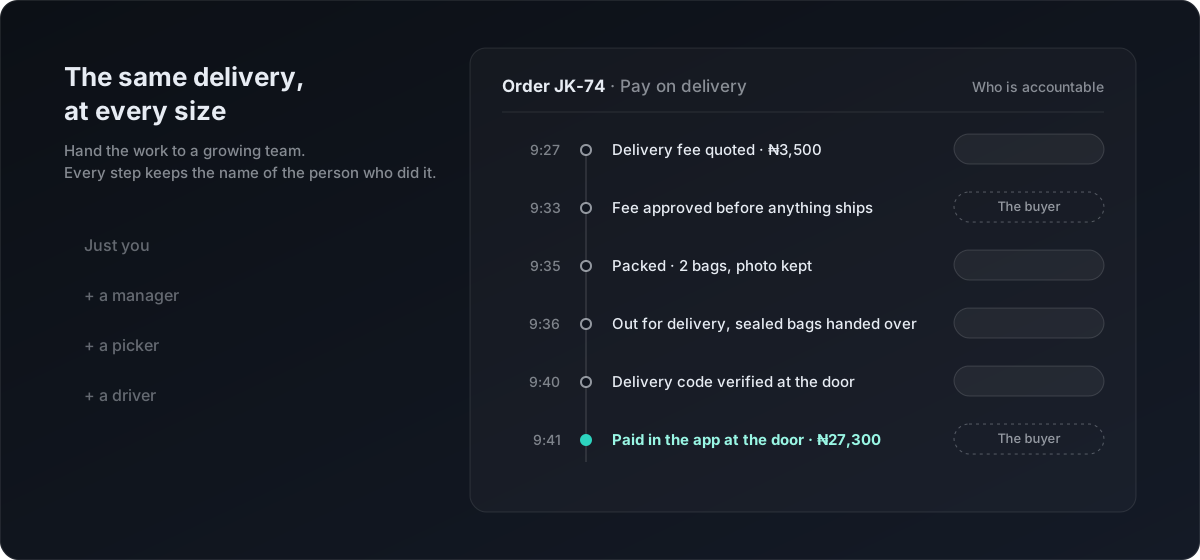
When the delivery agent arrives, your order screen shows a four-digit delivery code. It works like the OTP your bank sends: one order, one code, useless to anyone else. Read it to them, they enter it, and the delivery is on record: the right order, to the right person, at a recorded time.
The code lives on your order screen rather than buried in a notification, and it arrives by text as well. It cuts both ways deliberately. You get proof you received exactly what you paid for, and an honest seller gets proof against "it never arrived." Pickup counters use the same ceremony.
A delivery fee you approve before it ships
Some deliveries cannot be priced honestly at checkout: interstate waybills, bulky items, far-out addresses. Stores that quote per trip now charge no delivery fee at checkout at all. When your order is ready, the store sends the real figure, and nothing ships until you approve the exact amount.
Approve it and pay right away, pay it at the door with the rest, or, where the store's own driver collects it, pay the driver directly with the promise stated on your screen: never pay more than this. If the fee doesn't work for you, decline it; the order cancels, a prepaid order is refunded in full to your credits, and a pay-on-delivery order was never charged in the first place.
The quiet safety nets
- An order that never ships cancels itself after a week. Nothing was charged, and the app says so.
- An unpaid pay-on-delivery order cannot be marked delivered; Paylo refuses it until the money lands.
- Your protection does not end at the door. If something is wrong, report it from the order and your money stays with Paylo while it is sorted out.
- Every step carries a name: who set the delivery fee, who made the delivery, who confirmed it at the door.
Done right for sellers too
Pay on delivery has burned plenty of Nigerian sellers, which is why so many stores stopped offering it. Paylo's version was built with that history in mind:
- You choose to offer it. Switch it on in Payment Methods in the Paylo Business app; leave it off and nothing changes.
- Delivery fees you quote per trip. If you'd rather not set a fixed delivery fee, switch to quoting: your customers complete their order with no delivery charge, then you send the real figure for their address, and it ships the moment they approve. It replaces the rate table you had to manually maintain.
- The order tells you exactly when it has been paid, and nothing in the app lets a delivery complete before then.
- The delivery code protects you from "it never arrived" as much as it protects the buyer.
- Your team works within their roles. Sending a fee quote, shipping an order and confirming a delivery each follow the permissions you set, and every action is recorded against the person who took it, from the picker who packed the order to the driver who carried it.
FAQ
Get started
If you shop, look for Pay on delivery at checkout on stores that offer it. If you sell, it is one switch in the Paylo Business app under Payment Methods, and the proof, the blocks and the records above come with it. Open your free Paylo store and offer pay on delivery without the part that used to hurt.
Ready to sell with escrow and verification built in?
Open your Paylo store: ₦0 to start, unlimited products, Paystack checkout.
Start selling